
云端直播推流
功能介绍
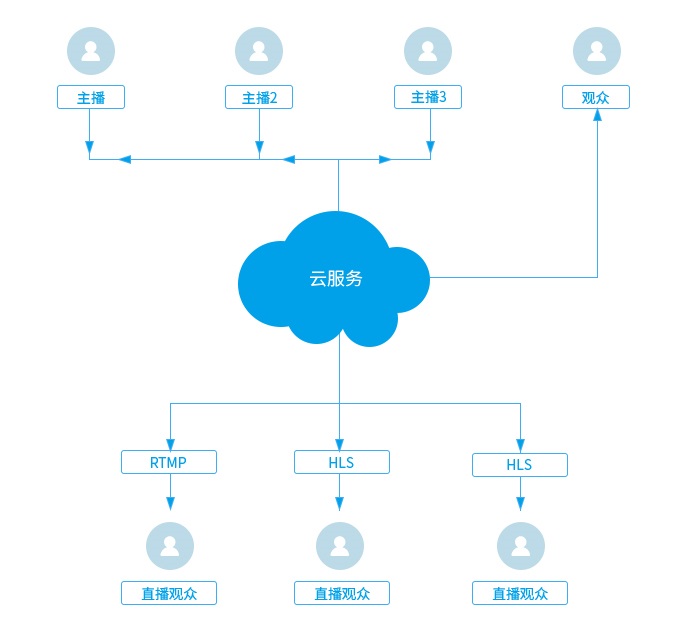
用于多个主播实时连麦互动。技术实现上,SDK 会把房间里多个主播的音视频在服务器合成一路流后推流到直播平台,直播观众可以获取RTMP或HLS流观看直播。
互动直播架构图:
1.开通服务
- 请确保您已成功注册了一个账号。
- 请联系商务为对应账号开通“云端直播服务”。
2.创建直播间并获得推流地址
可以是SDK系统的直播平台,也可以是第三方的直播平台,以SDK系统的直播平台:
- 创建直播间请参见:WEB API 创建直播。
- 获取直播推流地址请参见:WEB API 获取推流地址。
3.开始云端直播推流
- 左右布局示例图:

- 调用接口:
//配置混图器编码参数:1280*720, 15帧, 推流到rtmp://xxx
string cloudMixerCfg =
"{\
    \"mode\": 0,\
    \"videoFileCfg\": {\
        \"svrPathName\": \"rtmp://xxx\",\
        \"vWidth\": 1280,\
        \"vHeight\": 720,\
        \"vFps\": 15,\
        \"layoutConfig\": [\
            {\
                \"type\": 0,\
                \"top\": 180,\
                \"left\": 0,\
                \"width\": 640,\
                \"height\": 360,\
                \"keepAspectRatio\": 1,\
                \"param\": {\"camid\": \"Usr1.-1\"}\
            },\
            {\
                \"type\": 0,\
                \"top\": 180,\
                \"left\": 640,\
                \"width\": 640,\
                \"height\": 360,\
                \"keepAspectRatio\": 1,\
                \"param\": {\"camid\": \"Usr2.-1\"}\
            }\
        ]\
    }\
}"


string rsltMixerID = g_sdkMain->getSDKMeeting().createCloudMixer("task1", cloudMixerCfg.c_str());
相关API请参考:
createCloudMixer
4.更新互动直播内容
- 更新成画中画布局示例图:

- 接口调用:
string cloudMixerCfg =
"{\
    \"videoFileCfg\": {\
        \"layoutConfig\": [\
            {\
                \"type\": 0,\
                \"top\": 0,\
                \"left\": 0,\
                \"width\": 1280,\
                \"height\": 720,\
                \"keepAspectRatio\": 1,\
                \"param\": {\"camid\": \"Usr1.-1\"}\
            },\
            {\
                \"type\": 0,\
                \"top\": 265,\
                \"left\": 475,\
                \"width\": 160,\
                \"height\": 90,\
                \"keepAspectRatio\": 1,\
                \"param\": {\"camid\": \"Usr2.-1\"}\
            }\
        ]\
    }\
}"


CRVSDK_ERR_DEF err = g_sdkMain->getSDKMeeting().updateCloudMixerContent(m_mixerID, cloudMixerCfg.c_str());
if (err != CRVSDKERR_NOERR)
{
    //更新出错
}
相关API请参考:
updateCloudMixerContent
5.观众观看直播
通过 播放器SDK观看直播。
6.停止互动直播
停止云端直播推流后,也会触发事件notifyCloudMixerStateChanged
- 接口调用:
g_sdkMain->getSDKMeeting().destroyCloudMixer(m_mixerID);
相关API请参考:
destroyCloudMixer
notifyCloudMixerStateChanged
notifyCloudMixerEvent
7.回放点播
通过 点播API回放点播。