
云端直播推流
功能介绍
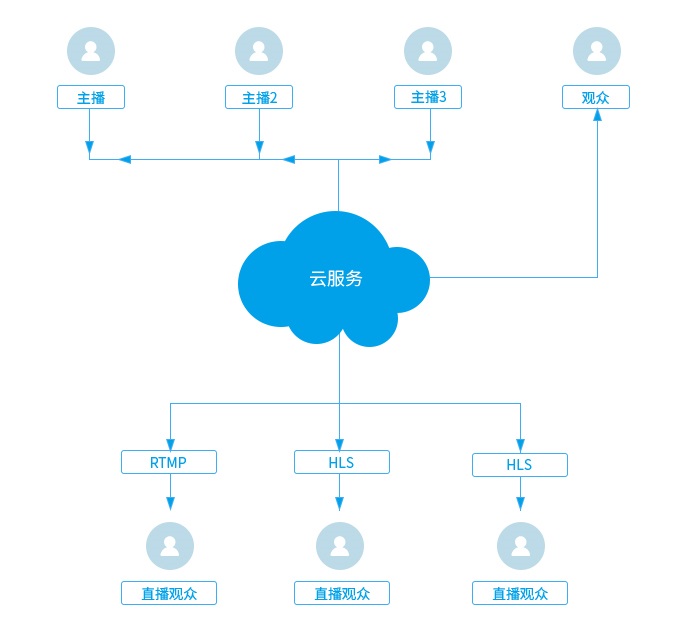
用于多个主播实时连麦互动。技术实现上,我们会把房间里多个主播的音视频在服务器合成一路流后推流到CDN流媒体服务器,直播观众可以获取RTMP或HLS流观看直播。
互动直播架构图:
1.创建直播间并获得推流地址
- 创建直播间请参见:Web API 创建直播。
- 获取直播推流地址请参见:Web API 获取推流地址。
2.开始云端直播推流
- 直播左右布局示例图:

- 调用接口:
//配置混图器编码参数:1280*720, 15帧, 推流到rtmp://xxx
string cloudMixerCfg =
"{\
    \"mode\": 0,\
    \"videoFileCfg\": {\
        \"svrPathName\": \"rtmp://xxx\",\
        \"vWidth\": 1280,\
        \"vHeight\": 720,\
        \"vFps\": 15,\
        \"layoutConfig\": [\
            {\
                \"type\": 0,\
                \"top\": 180,\
                \"left\": 0,\
                \"width\": 640,\
                \"height\": 360,\
                \"keepAspectRatio\": 1,\
                \"param\": {\"camid\": \"Usr1.-1\"}\
            },\
            {\
                \"type\": 0,\
                \"top\": 180,\
                \"left\": 640,\
                \"width\": 640,\
                \"height\": 360,\
                \"keepAspectRatio\": 1,\
                \"param\": {\"camid\": \"Usr2.-1\"}\
            }\
        ]\
    }\
}"

String mixerID = RTCMeeting.getInstance().createCloudMixer(cloudMixerCfg);
 if (mixerID.Length <= 0) {
    //开启云端直播出错, 关注回调createCloudMixerFailed
    ...
}
相关API请参考:
createCloudMixer
createCloudMixerFailed
cloudMixerStateChanged
3.更新互动直播内容
- 更新成画中画布局示例图:

- 接口调用:
string cloudMixerCfg =
"{\
    \"videoFileCfg\": {\
        \"layoutConfig\": [\
            {\
                \"type\": 0,\
                \"top\": 0,\
                \"left\": 0,\
                \"width\": 1280,\
                \"height\": 720,\
                \"keepAspectRatio\": 1,\
                \"param\": {\"camid\": \"Usr1.-1\"}\
            },\
            {\
                \"type\": 0,\
                \"top\": 265,\
                \"left\": 475,\
                \"width\": 160,\
                \"height\": 90,\
                \"keepAspectRatio\": 1,\
                \"param\": {\"camid\": \"Usr2.-1\"}\
            }\
        ]\
    }\
}"


CRVIDEOSDK_ERR_DEF err  = RTCMeeting.getInstance().updateCloudMixerContent(mixerID, cloudMixerCfg);
相关API请参考:
updateCloudMixerContent
4.观众观看直播
通过 播放器SDK观看直播。
5.停止互动直播
停止云端直播推流后,会触发事件cloudMixerStateChanged
- 接口调用:
RTCMeeting.getInstance().destroyCloudMixer(mixerID);
相关API请参考:
destroyCloudMixer
cloudMixerStateChanged
6.回放点播
通过 点播API回放点播。